Python web scraping is easy right up until it isn't. The first scraper takes twenty minutes. Then you point it at a real site. You get an empty list, a 403, or a page that says "verify you are human."
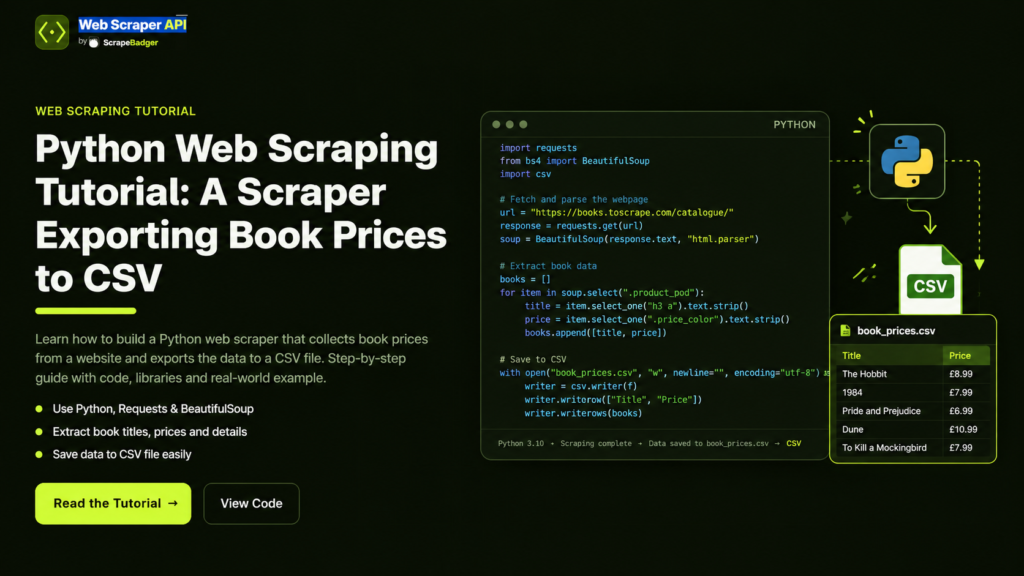
This guide builds one scraper from scratch with requests and BeautifulSoup. It collects every book title, price and rating from a practice site, follows the pagination and saves a CSV. Then we take the same code and hit the three walls every scraper meets: pages built with JavaScript, sites that block you, and scale. At each wall you'll see what the failure looks like and the free fix. You'll also see when a fix stops being worth your afternoon.
Full disclosure: the last section uses Web-Scraper-API, the web scraping API this site is about. Everything before it is free and works without us.
What is web scraping in Python?
Web scraping in Python means writing a script that downloads web pages and pulls specific data out of them, like prices, names or links, then saves it somewhere useful. Web scraping using Python is the most common way to do it. If you'd like the longer version, our answer on what web scraping is covers it.
Every scraper, from a 20-line script to a crawler doing millions of pages, runs the same loop:
- Fetch the page's HTML.
- Parse it and pick out the fields you want.
- Store the results, then fetch the next page.
Here's the thing most tutorials get backwards. Parsing is the easy part. Fetching is where scrapers break, because fetching is the part the website controls. So we'll keep those two jobs in separate functions from the first line of code. When a site starts fighting back, you'll only need to swap one of them.
One more thing before we start. If the site offers an official API or a data export, use that instead. It's faster, it's allowed, and it won't break when someone redesigns the page.
Set up your Python web scraping project
You need Python 3.10 or newer. The plain scraper runs on older versions too, but the ScrapeBadger SDK in the last section needs 3.10. Make a folder, create a virtual environment and install three packages:
mkdir book-scraper && cd book-scraper
python -m venv .venv
source .venv/bin/activate        # Windows: .venv\Scripts\activate
pip install requests beautifulsoup4 lxml
What each one does:
- requests downloads pages. It's the most popular HTTP library for Python, and version 2.34.2 is current.
- beautifulsoup4 turns raw HTML into something you can search (4.15.0 at the time of writing).
- lxml is a fast HTML parser. It's the one we'll tell BeautifulSoup to use.
Versions checked on PyPI, October 2026.
Our target is books.toscrape.com, a fake bookstore built for people learning to scrape. It has 1,000 books across 50 pages, with no login and no blocking. Practice there before you aim at a real site.
Web scraping with Python, step by step
Four steps: fetch, parse, follow the pages, save. Each one is a small function, and the full script comes together at the end.
Step 1: Fetch the page with requests
Start with the fetch function. It downloads one URL and hands back the raw HTML:
import requests

HEADERS = {"User-Agent": "Mozilla/5.0 (compatible; book-price-tutorial/1.0)"}


def fetch(url, session):
    """Download one page and return its HTML as bytes."""
    response = session.get(url, headers=HEADERS, timeout=15)
    response.raise_for_status()
    return response.content
Three small choices in there save you pain later:
- A User-Agent header. By default, requests announces itself as
python-requests/2.x. Plenty of sites block that on sight. Sending a browser-style string, or an honest one that names your project, gets you past the laziest filters. It won't get you past a real anti-bot system, but we'll get there. - A timeout. Without one, a slow server can hang your script forever. Fifteen seconds is plenty for most pages.
raise_for_status(). It turns a 404 or a 500 into an exception, so your script fails loudly instead of quietly parsing an error page.
We pass in a requests.Session rather than calling requests.get directly. A session reuses the same connection for every request to a site, which is noticeably faster across 50 pages. It also keeps cookies between requests, which some sites expect.
Notice we return response.content (bytes) rather than response.text. Small thing. It matters, though, and we'll come back to why.
Step 2: Parse the HTML with BeautifulSoup
Now the easy part. Open books.toscrape.com in Chrome, right-click a book title and pick Inspect. DevTools shows you the HTML behind it. Each book sits in an <article class="product_pod">, and inside it you'll find everything you need:
- the title in the
titleattribute of the link inside<h3> - the price in
<p class="price_color"> - the stock status in
<p class="availability"> - the rating as a class name on
<p class="star-rating Three">
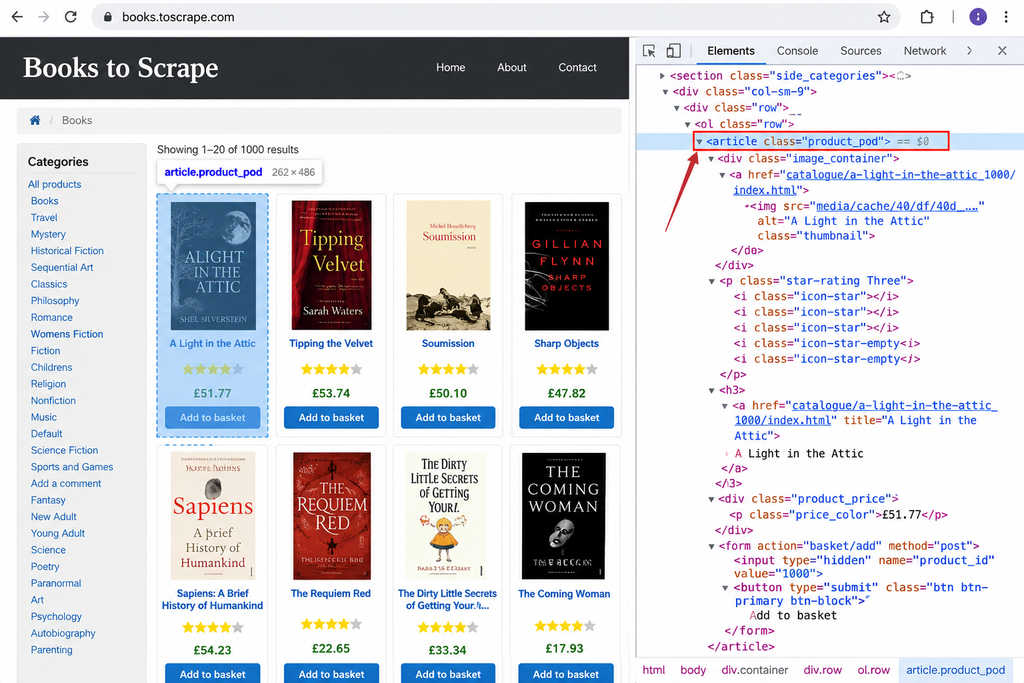
Those are CSS selectors, and BeautifulSoup's select() and select_one() take them directly:
from urllib.parse import urljoin

from bs4 import BeautifulSoup

RATINGS = {"One": 1, "Two": 2, "Three": 3, "Four": 4, "Five": 5}


def parse(html, page_url):
    """Pull every book on the page, plus the link to the next page."""
    soup = BeautifulSoup(html, "lxml")
    books = []
    for card in soup.select("article.product_pod"):
        link = card.select_one("h3 a")
        rating_classes = card.select_one("p.star-rating")["class"]
        books.append({
            "title": link["title"],
            "price": card.select_one("p.price_color").get_text(strip=True),
            "in_stock": "In stock" in card.select_one("p.availability").get_text(),
            "rating": next((RATINGS[c] for c in rating_classes if c in RATINGS), None),
            "url": urljoin(page_url, link["href"]),
        })
    next_link = soup.select_one("li.next a")
    next_url = urljoin(page_url, next_link["href"]) if next_link else None
    return books, next_url
A few details worth slowing down for.
We read the title from the link's title attribute, not its text. Why? Long titles get cut off on the page ("A Light in the ..."), but the attribute holds the full one. That's the kind of thing you only spot in DevTools, so always check what's actually in the HTML before you trust what's on screen.
The rating isn't text at all. It's the second class name, so we look up "Three" in a small dictionary and get 3.
And urljoin turns relative links like catalogue/page-2.html into full URLs. Skip it and your next request goes nowhere.
Notice parse() never touches the network. It takes HTML and gives back data. That separation is the whole trick of this guide, and it pays off in the last section.
If you see AttributeError: 'NoneType' object has no attribute 'get_text', a select_one() call found nothing. Either the selector is wrong, or the page you downloaded isn't the page you think it is. Print the first few hundred characters of the HTML before you blame the selector. Half the time it's a block page or a cookie banner.
Step 3: Follow pagination
One page has 20 books. We want all 1,000. Each page has a "next" button pointing to the following page, and the last page doesn't have one. So the loop is simple: keep following "next" until it's gone.
import time


def scrape_all(start_url, max_pages=None, delay=1.0):
    all_books, url, pages = [], start_url, 0
    with requests.Session() as session:
        while url and (max_pages is None or pages < max_pages):
            books, url = parse(fetch(url, session), url)
            all_books.extend(books)
            pages += 1
            print(f"page {pages}: {len(books)} books (total {len(all_books)})")
            time.sleep(delay)
    return all_books
The time.sleep(delay) matters more than it looks. One request a second is polite and keeps you off most rate limits. Firing 50 requests at once from a single IP is how you meet your first block, and on someone else's site it's simply rude.
max_pages is there for testing. Run scrape_all(START_URL, max_pages=2) while you're fixing selectors, so a typo costs you two requests, not fifty.
Step 4: Save the data to CSV and JSON
Last step: write the results somewhere useful. CSV opens in Excel or Google Sheets. JSON is easier to load into another program.
import csv
import json


def save(books):
    with open("books.csv", "w", newline="", encoding="utf-8") as f:
        writer = csv.DictWriter(f, fieldnames=books[0].keys())
        writer.writeheader()
        writer.writerows(books)
    with open("books.json", "w", encoding="utf-8") as f:
        json.dump(books, f, ensure_ascii=False, indent=2)
The full Python web scraping code
Here's everything in one file. Save it as books_scraper.py and run python books_scraper.py:
import csv
import json
import time
from urllib.parse import urljoin

import requests
from bs4 import BeautifulSoup

START_URL = "https://books.toscrape.com/"
HEADERS = {"User-Agent": "Mozilla/5.0 (compatible; book-price-tutorial/1.0)"}
RATINGS = {"One": 1, "Two": 2, "Three": 3, "Four": 4, "Five": 5}


def fetch(url, session):
    """Download one page and return its HTML as bytes."""
    response = session.get(url, headers=HEADERS, timeout=15)
    response.raise_for_status()
    return response.content


def parse(html, page_url):
    """Pull every book on the page, plus the link to the next page."""
    soup = BeautifulSoup(html, "lxml")
    books = []
    for card in soup.select("article.product_pod"):
        link = card.select_one("h3 a")
        rating_classes = card.select_one("p.star-rating")["class"]
        books.append({
            "title": link["title"],
            "price": card.select_one("p.price_color").get_text(strip=True),
            "in_stock": "In stock" in card.select_one("p.availability").get_text(),
            "rating": next((RATINGS[c] for c in rating_classes if c in RATINGS), None),
            "url": urljoin(page_url, link["href"]),
        })
    next_link = soup.select_one("li.next a")
    next_url = urljoin(page_url, next_link["href"]) if next_link else None
    return books, next_url


def scrape_all(start_url, max_pages=None, delay=1.0):
    all_books, url, pages = [], start_url, 0
    with requests.Session() as session:
        while url and (max_pages is None or pages < max_pages):
            books, url = parse(fetch(url, session), url)
            all_books.extend(books)
            pages += 1
            print(f"page {pages}: {len(books)} books (total {len(all_books)})")
            time.sleep(delay)
    return all_books


def save(books):
    with open("books.csv", "w", newline="", encoding="utf-8") as f:
        writer = csv.DictWriter(f, fieldnames=books[0].keys())
        writer.writeheader()
        writer.writerows(books)
    with open("books.json", "w", encoding="utf-8") as f:
        json.dump(books, f, ensure_ascii=False, indent=2)


if __name__ == "__main__":
    books = scrape_all(START_URL)
    save(books)
    print(f"Saved {len(books)} books to books.csv and books.json")
With the one-second delay it takes about a minute and a half, and the end of the output looks like this:
page 49: 20 books (total 980)
page 50: 20 books (total 1000)
Saved 1000 books to books.csv and books.json
That's a working Python web scraper. On a site like this one, it's also all you'll ever need. Seriously: if your target is static, small and doesn't block you, stop here. No API, no headless browser, no bill.
Most real sites aren't like this one, though.
Wall 1: The page is built with JavaScript
Let's point the same approach at quotes.toscrape.com/js/, another practice page. In your browser it shows ten quotes. To your scraper, it shows nothing:
import requests
from bs4 import BeautifulSoup

html = requests.get("https://quotes.toscrape.com/js/", timeout=15).text
soup = BeautifulSoup(html, "lxml")
print("div.quote elements found:", len(soup.select("div.quote")))
div.quote elements found: 0No error. No exception. Just an empty list, which is the most confusing failure in scraping.
Here's what happened. requests downloads the HTML the server sends, and that's all. It doesn't run JavaScript. On this page, the server sends a nearly empty shell plus a script, and the script builds the quotes inside your browser after the page loads. Your browser ran it. requests didn't.
How to spot it in ten seconds: press Ctrl+U (View Page Source) and search for text you can see on the page. If it's not in the source but it is in DevTools' Elements tab, JavaScript built it. View Source shows what requests gets. DevTools shows what the browser made of it.
Fix 1: Find the data the JavaScript uses
The data has to come from somewhere. Often it's already sitting in the page inside a <script> tag, or the page fetches it from a JSON endpoint you can call yourself. On this page it's the first case:
import json
import re

match = re.search(r"var data = (\[.*?\]);", html, re.S)
quotes = json.loads(match.group(1))
print(len(quotes), "quotes found in the script tag")
print(quotes[0]["text"], "-", quotes[0]["author"]["name"])
10 quotes found in the script tag
“The world as we have created it is a process of our thinking. It cannot be changed without changing our thinking.” - Albert EinsteinThis is the best fix when it works: it's free, fast and gives you clean JSON. On real sites, check DevTools' Network tab, filter by Fetch/XHR, and reload. If you see a request returning the data you want, call that URL directly with requests. It's usually far easier than parsing HTML.
Fix 2: Use a headless browser
When the data only exists after a lot of JavaScript runs, you need a real browser that runs without a window. Playwright and Selenium both do this from Python. Playwright is the easier of the two to set up today:
from playwright.sync_api import sync_playwright

with sync_playwright() as p:
    browser = p.chromium.launch()
    page = browser.new_page()
    page.goto("https://quotes.toscrape.com/js/")
    page.wait_for_selector("div.quote")
    html = page.content()
    browser.close()
(Install it with pip install playwright, then playwright install chromium.)
The html you get back is what the browser saw, so the parse() approach works on it again. That's the beauty of keeping fetch and parse apart.
The cost is speed and memory. Every page now starts a browser tab, loads every script, image and font, and waits. Expect seconds per page instead of a fraction of a second, and a few hundred MB of RAM per browser. Fine for 50 pages. Painful for 50,000. We go deeper on this in our guide to JavaScript rendering.
Bottom line: Check View Source first, then the Network tab. Reach for a headless browser only when the data truly isn't anywhere else.
Wall 2: The site blocks you
Practice sites never block you. Real ones do, and they're getting better at it. Most big e-commerce, travel and social sites sit behind an anti-bot service like Cloudflare, DataDome or Akamai. Those services look at much more than your User-Agent: your IP's reputation, how your connection's TLS handshake looks, whether a real browser is running, and how fast you're clicking around.
Blocks show up in a few forms:
- 403 Forbidden: you've been identified and refused.
- 429 Too Many Requests: you're going too fast for this site.
- 503 with a challenge page: often Cloudflare's "Just a moment..." screen.
- A 200 that isn't the page. This is the sneaky one. The status code says success, but the body is a CAPTCHA or a "verify you are human" page. Your
parse()returns nothing and nobody gets an error.
That last case is why checking response.status_code == 200 isn't enough. Check the body too. Here's a rough helper:
BLOCK_STATUSES = {403, 429, 503}
BLOCK_MARKERS = (
    "captcha",
    "just a moment",          # Cloudflare's interstitial title
    "attention required",
    "access denied",
    "verify you are human",
    "unusual traffic",
)


def looks_blocked(response):
    """A rough check: a block can come back as a 200 with a challenge page."""
    if response.status_code in BLOCK_STATUSES:
        return True
    head = response.text[:5000].lower()
    return any(marker in head for marker in BLOCK_MARKERS)
It's a heuristic, not a guarantee. Some real pages mention "captcha" in a footer script, so tune the markers to your target. Still, it beats finding out three days later that your price tracker has been saving challenge pages.
The free fixes, and where they stop
Try these in order, and stop when one works:
- Slow down. Raise the delay, add a little randomness, and back off when you see a 429. Many "blocks" are just rate limits.
- Look like a browser. Send a full set of realistic headers (
Accept,Accept-Languageand so on), not just a User-Agent. - Keep a session. Reuse cookies the way a browser would, so you're one visitor instead of a hundred new ones.
- Retry with backoff. A failed request isn't always a block. Retry a couple of times, waiting longer each time.
- Change your IP. Rotating proxies spread requests over many addresses. Datacenter proxies are cheap and widely blocked. Residential proxies cost much more and work far better.
Here's steps 1 and 4 together in code: a version of fetch() that backs off and retries when it hits a 429 or a timeout. It respects the site's Retry-After header when there is one:
def fetch(url, session, retries=3):
    for attempt in range(retries):
        last_try = attempt == retries - 1
        try:
            response = session.get(url, headers=HEADERS, timeout=15)
        except requests.Timeout:
            if last_try:
                raise
            time.sleep(5 * 2 ** attempt)
            continue
        if response.status_code == 429 and not last_try:
            # Retry-After is usually seconds; if it's a date, fall back to our own wait
            retry_after = response.headers.get("Retry-After", "")
            time.sleep(int(retry_after) if retry_after.isdigit() else 5 * 2 ** attempt)
            continue
        response.raise_for_status()
        return response.content
Same name, same arguments, same return value, so the rest of the scraper doesn't notice the change.
Steps 1 to 4 are free and handle a surprising number of sites. Step 5 is where scraping stops being a weekend project. Now you're buying proxies, rotating them, retiring the burned ones, and pairing them with a headless browser that doesn't give itself away. Against a serious anti-bot system, that's an ongoing job, because the vendors update their detection and your setup has to keep up.
If you've ever wondered how a site tells a script from a person, our answer on whether websites can detect scraping goes through the signals.
Bottom line: Slow down and look like a browser first. If you're shopping for residential proxies and stealth plugins, that's the moment to price an API against your time.
Wall 3: Scale
Say the scraper works. Now you need 200,000 product pages every night instead of 50.
A sequential loop with a one-second delay would take more than two days. So you add concurrency, with asyncio and httpx, or a thread pool. Then the list grows. You need retries that don't hammer a struggling site, and a queue so a crash doesn't lose your place. You need monitoring, so you notice when a site changes its HTML. And you need enough proxies that 50 parallel requests don't all share one IP. If any of those pages need JavaScript, you're also running a fleet of headless browsers that leak memory if you look at them wrong.
None of this is hard to understand. It's just a lot of code that isn't about the data you wanted.
For big crawls you control end to end, Scrapy is the standard Python answer. It handles scheduling, retries, concurrency and export pipelines out of the box. Our upcoming guide to the best Python web scraping libraries compares it with the rest.
Bottom line: Scale turns a script into infrastructure. Decide early whether you want to own that infrastructure.
The same scraper with a web scraping API
A scraping API takes over the fetch step. You send it a URL. It handles the proxies, the headless browser and the anti-bot challenges, then hands back the HTML. Your parse() function doesn't change at all.
Here's our book scraper rewritten to fetch through Web-Scraper-API with the official Python SDK. Install it with pip install scrapebadger. It's async, so the loop gets an await:
import asyncio
import os

from scrapebadger import ScrapeBadger
from scrapebadger import BlockedError

from books_scraper import parse, save, START_URL


async def fetch(client, url):
    result = await client.web.scrape(url, escalate=True, max_cost=7)
    print(f"{url} -> {result.credits_used} credits via {result.engine_used}")
    return result.content


async def main():
    all_books, url = [], START_URL
    async with ScrapeBadger(api_key=os.environ["SCRAPEBADGER_API_KEY"]) as client:
        while url:
            try:
                html = await fetch(client, url)
            except BlockedError as e:
                print(f"Blocked on {url}: {e.block_kind} ({e.vendor}). Not charged.")
                break
            books, url = parse(html, url)
            all_books.extend(books)
    if all_books:
        save(all_books)
    print(f"Saved {len(all_books)} books")


asyncio.run(main())
Same parse(), same save(), same CSV. Only fetch() changed. What the new arguments do:
escalate=Truestarts with the cheapest method and steps up to a more capable engine only if the page blocks it. You pay for the method that worked, not every attempt.max_cost=7is a ceiling per request. Seven credits covers a browser render on the default proxy, but stops short of residential proxies (13 credits or more). A request that would cost more fails instead of surprising you on the invoice. Raise it when a site truly needs residential IPs, or set it to 3 if you only ever want the cheapest fetch.result.credits_usedandresult.engine_usedtell you what each page actually cost and how it was fetched. The result also has ablocking_detectedflag, which is thelooks_blocked()check done for you.BlockedErroris raised when every attempt still hits a wall. Blocked requests aren't charged.
For the JavaScript page from Wall 1, add one argument inside your async fetch():
result = await client.web.scrape(url, render_js=True, max_cost=7)That runs the page in a real browser on the API's side and returns the rendered HTML. No Playwright install, no Chromium on your server. The anti-bot bypass page lists the protection systems it handles, including Cloudflare, DataDome, Akamai, Imperva, PerimeterX and Kasada.
Prefer plain requests over an SDK? The REST call is one POST:
import os

import requests

response = requests.post(
    "https://scrapebadger.com/v1/web/scrape",
    headers={"x-api-key": os.environ["SCRAPEBADGER_API_KEY"]},
    json={"url": "https://quotes.toscrape.com/js/", "render_js": True},
    timeout=120,
)
response.raise_for_status()
data = response.json()
print(data["credits_used"], "credits")
html = data["content"]
Fetch pages in parallel
Books.toscrape.com's page URLs follow a pattern (catalogue/page-2.html, page-3.html and so on), so you don't have to discover them one by one. With the async SDK you can fetch several at once and cap how many run together. Swap the asyncio.run(main()) line at the bottom of the script for this:
from scrapebadger import RateLimitError


async def scrape_pages(urls, limit=3):
    semaphore = asyncio.Semaphore(limit)
    async with ScrapeBadger(api_key=os.environ["SCRAPEBADGER_API_KEY"]) as client:
        async def one(url):
            async with semaphore:
                for attempt in range(3):
                    try:
                        books, _ = parse(await fetch(client, url), url)
                        return books
                    except RateLimitError as e:
                        await asyncio.sleep(e.retry_after or 5)
                    except BlockedError:
                        return []
                return []
        pages = await asyncio.gather(*(one(url) for url in urls))
    return [book for page in pages for book in page]


urls = [f"https://books.toscrape.com/catalogue/page-{n}.html" for n in range(1, 51)]
books = asyncio.run(scrape_pages(urls))
save(books)
Each page handles its own errors, so one rate limit or blocked page doesn't sink the whole batch. Mind your plan's rate limit while you tune limit. Pay-as-you-go allows 60 requests a minute and the paid plans allow 300 or 1,000, per the pricing page. On pay-as-you-go, start with limit=1.
What it costs
Every request costs an engine fee plus a proxy fee, per the ScrapeBadger docs. A plain HTTP page through the default proxy is 3 credits. A page rendered in a browser is 7. Add a residential proxy and those become 13 and 17, after the proxy price change that took effect on October 15. Failed requests cost nothing.
So our 50-page book scrape costs about 150 credits. The 1,000 free credits you get at signup cover it six times over.
Rendered pages cost more. At the pay-as-you-go rate of $0.15 per 1,000 credits, 1,000 of them cost about $1.05. On the Starter plan ($49 for 600,000 credits) it's about $0.57.
Is that worth it? For books.toscrape.com, no. It's free to scrape yourself, and you just did. For a site behind Cloudflare that needs residential IPs and a browser, compare that $1 to the hours you'd spend keeping your own proxy pool and browser fleet alive. That's the real decision.
Common Python web scraping errors and fixes
| What you see | Usual cause | Fix |
|---|---|---|
AttributeError: 'NoneType' object has no attribute ... | select_one() matched nothing | Print the HTML you received, then re-check the selector in DevTools |
| An empty list, no error | The page is built with JavaScript, or you got a block page with a 200 | View Source vs DevTools (Wall 1), then looks_blocked() (Wall 2) |
403 Forbidden | Your request was identified as a bot | Realistic headers first, then better IPs or an API |
429 Too Many Requests | You're going too fast | Slow down and back off with Retry-After |
ReadTimeout or ConnectionError | Slow or flaky server | Raise the timeout and retry with a growing wait |
£ or other garbled characters | The page was decoded with the wrong encoding | Parse response.content, and write files with encoding="utf-8" |
The last one bites more people than you'd think. When a server sends text/html without saying which character set it uses, requests assumes ISO-8859-1 for response.text, an old HTTP default. If the page is really UTF-8, £ turns into £. Our practice bookstore is one of those servers: it sends plain `text/html`, and `response.text` shows £51.77 as £51.77. Handing BeautifulSoup the raw bytes lets it read the encoding from the page itself. That's the reason Step 1 returns response.content.
Scrape responsibly
Being able to scrape a page doesn't always mean you should. A few rules keep you on the right side of site owners, and usually the law:
- Check robots.txt (
/robots.txton any site) and respect its rules for the paths you scrape. - Read the terms of service. Some sites forbid automated access outright.
- Go easy. Keep your request rate low enough that you'd never slow the site down for real users.
- Avoid personal data, or handle it the way GDPR and similar laws require. Public doesn't automatically mean free to collect.
- Don't scrape behind a login you don't have permission to automate.
The legal picture varies by country and by what you collect. Our answer on whether web scraping is legal walks through the main cases. It isn't legal advice, and for anything commercial and sensitive, ask a lawyer.
FAQ
What is web scraping in Python?
It's using a Python script to download web pages and extract specific data from them, such as prices, titles or links, then saving it to a file or database. The usual web scraping Python stack is requests to fetch pages and BeautifulSoup to parse the HTML. For pages built with JavaScript, a headless browser like Playwright or a scraping API does the fetching.
Is Python good for web scraping?
Yes, and it's the usual first choice. requests and BeautifulSoup make simple scrapers short and readable, Scrapy handles large crawls, Playwright drives real browsers, and pandas cleans the data afterwards. The language is rarely the bottleneck. Blocks and JavaScript are.
Which Python library is best for web scraping?
It depends on the site. Static pages: requests plus BeautifulSoup is the easiest start. Large crawls call for Scrapy. JavaScript-heavy pages need Playwright or Selenium. And protected sites usually mean pairing any of them with proxies, or handing the fetching to a scraping API.
Is BeautifulSoup better than Scrapy?
They do different jobs. BeautifulSoup only parses HTML you've already downloaded, which makes it ideal for small scripts and for learning. Scrapy is a full crawling tool with scheduling, retries and export built in. Plenty of people learn on BeautifulSoup and move to Scrapy once a project outgrows a single script.
How do I scrape a website that uses JavaScript in Python?
First, check whether the data is already in the page source or a JSON request in DevTools' Network tab, and fetch that directly. If not, render the page with a headless browser like Playwright, then parse the result with BeautifulSoup. A scraping API with JavaScript rendering does the same job without running browsers yourself.
Start simple, then upgrade one function
Build with requests and BeautifulSoup first. Keep fetch() and parse() separate. When a site starts fighting back, upgrade the fetch step and nothing else: a smarter request, then a headless browser, then an API. A good rule of thumb: once a wall costs you more than an afternoon, a scraping API is probably cheaper than your time.
Want to try the API version of this script? Sign up for 1,000 free credits, with no credit card needed, and swap in the new fetch().