A web scraping API looks affordable right up until you start scraping the websites that actually matter to your project. Once a site renders content with JavaScript, checks browser fingerprints, and throws CAPTCHAs, your plan's credit count becomes a poor guide to the real cost.
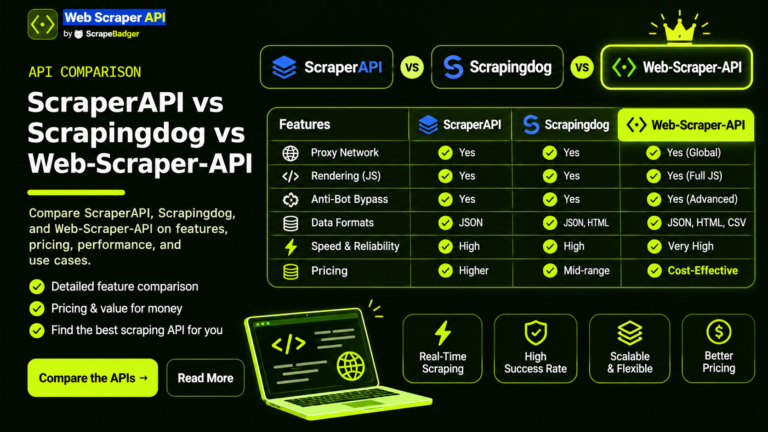
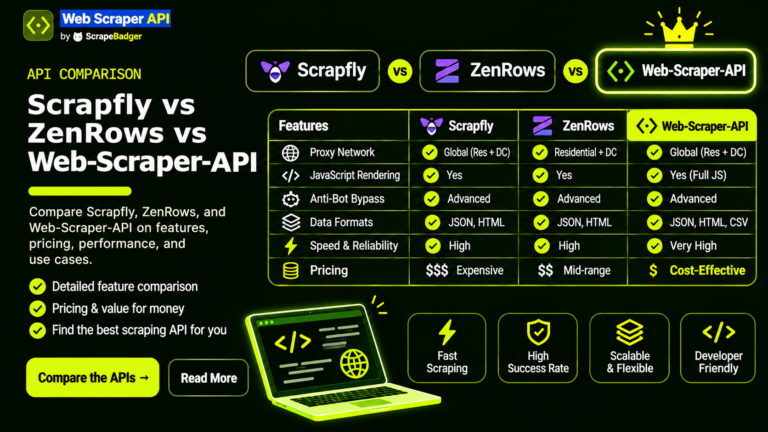
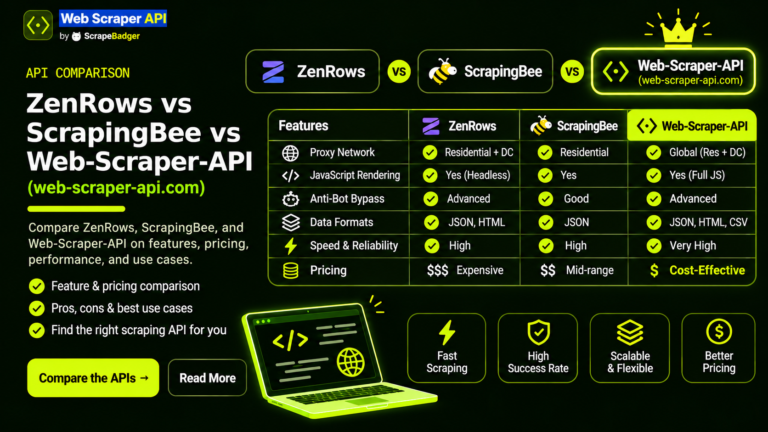
ScrapingBee, Scrapingdog, and WebScraperAPI all handle the infrastructure behind web scraping, but they charge differently for rendering, proxies, and other request options. For a JavaScript-rendered page through a premium or residential proxy, ScrapingBee and Scrapingdog charge 25 credits, while WebScraperAPI charges 13.
This guide compares pricing, anti-bot handling, JavaScript rendering, data extraction, integrations, and AI-agent support, and turns credit costs into an estimate for 1,000 successful requests.
ScrapingBee vs. Scrapingdog vs. WebScraperAPI at a glance
| Feature | ScrapingBee | Scrapingdog | WebScraperAPI |
|---|---|---|---|
| Entry-level paid option | $49/month | $10 pay-as-you-go or $40/month | $10 pay-as-you-go or $49/month |
| Free credits | 1,000 | 100 | 1,000 |
| Plain HTML request* | 1 credit | 1 credit | 2 credits |
| JavaScript-rendered request | 5 credits | 5 credits | 6 credits |
| Premium proxy, without JS | 10 credits | 10 credits | 9 credits |
| JavaScript + premium proxy | 25 credits | 25 credits | 13 credits |
| Failed requests | 200, 404 and 410 count as successful for billing | Not charged | Not charged |
| Pay-as-you-go | Not offered | From $10, non-expiring | From $10, non-expiring |
| MCP integration | Hosted | Local server | Hosted, with OAuth options |
| Compliance information | SOC 2 Type II, GDPR | GDPR and DPA information | GDPR and DPA information |
Who is behind each web scraping API?
The company behind an API matters for product direction, security requirements, and long-term fit.
ScrapingBee
Founded in France in 2019, ScrapingBee provides a managed scraping API with JavaScript rendering, rotating and premium proxies, data extraction, and dedicated APIs for sources such as Google and Amazon. In June 2025, Oxylabs' company group announced that it had acquired ScrapingBee, which continues to operate as a separate brand. For one-to-one comparisons, see our ScrapingBee alternative page.
Scrapingdog
Scrapingdog offers a general web scraping API alongside dedicated endpoints for search engines, social data, and e-commerce platforms such as Flipkart, across 27 subscription plans from small developer projects to very large monthly workloads.
WebScraperAPI
WebScraperAPI is powered by ScrapeBadger's scraping infrastructure. It combines general web scraping, dedicated data APIs for search engines, e-commerce, and social media, automatic engine selection, proxy management, and MCP integrations under one API account.
Pricing and credit systems compared
The lowest price per credit doesn't necessarily translate into the lowest price per page, because each provider charges differently for rendering, proxy selection, and extraction.
Plans and free credits
| Provider | Entry subscription | Credits included | Pay-as-you-go |
|---|---|---|---|
| ScrapingBee | Freelance, $49/month | 250,000/month | Not offered |
| Scrapingdog | Lite, $40/month | 200,000/month | From $10 (25,000 credits) |
| WebScraperAPI | Starter, $49/month | 600,000/month | From $10 (about 66,700 credits) |
How much do 1,000 pages really cost?
The estimates below use each plan's price divided by its monthly credit allowance, multiplied by the credits required for 1,000 requests.
| Request type | ScrapingBee Freelance ($49) | Scrapingdog Lite ($40) | WebScraperAPI Starter ($49) | ScrapingBee Startup ($99) | Scrapingdog Standard ($90) | WebScraperAPI Growth ($129) |
|---|---|---|---|---|---|---|
| Plain HTML | $0.20 | $0.20 | $0.16 | $0.10 | $0.09 | $0.14 |
| JavaScript rendering | $0.98 | $1.00 | $0.49 | $0.50 | $0.45 | $0.43 |
| Premium proxy, no JS | $1.96 | $2.00 | $0.74 | $0.99 | $0.90 | $0.65 |
| JavaScript + premium proxy | $4.90 | $5.00 | $1.06 | $2.48 | $2.25 | $0.93 |
Scrapingdog and ScrapingBee are cheaper for plain HTML at the higher tiers. With JavaScript rendering the gap narrows, and with a premium proxy WebScraperAPI costs substantially less than either. Both competitors enable rendering by default, so turning it off for pages that don't need it cuts a request from five credits to one. For more details take a look at the Scrapingdog alternative page.
Failed requests and credit expiry
Scrapingdog doesn't charge for failed requests, and WebScraperAPI doesn't charge for blocked requests, timeouts, or empty responses. ScrapingBee counts HTTP 200, 404, and 410 responses as successful, so a request for a missing page still consumes credits. WebScraperAPI also lets you cap spend per request with max_cost and reports each charge through credits_used and the X-Credits-Used header.
WebScraperAPI's pay-as-you-go credits never expire, and neither do Scrapingdog's, though Scrapingdog's PAYG can't be combined with a subscription. ScrapingBee is subscription-only: unused monthly credits don't roll over, and one-time add-ons expire when the subscription renews.
Bottom line: Work out the credit cost of your actual requests, including failures and optional features, before deciding which subscription offers better value.
Anti-bot bypass and CAPTCHA handling
Anti-bot results depend on the target site, so treat every vendor's claims as something to test.
ScrapingBee's Auto-Mode starts with cheaper configurations and escalates through JavaScript rendering, premium proxies, and stealth proxies, charging only for the configuration that succeeds. Its HTML API documentation explains the credit tiers.
Scrapingdog advertises CAPTCHA solving, fingerprint rotation, and residential proxies.
WebScraperAPI's current documentation identifies Cloudflare, DataDome, Akamai, Imperva, PerimeterX, and Kasada among the anti-bot systems it handles. Its engine: auto setting picks a fast HTTP request or a full browser for each page, and the escalate option steps up to a stronger engine when a request is blocked. Its Cloudflare bypass page covers the Cloudflare-specific approach.
No independently verified, like-for-like success-rate benchmark covers all three services.
Bottom line: Test representative URLs against all three providers and compare complete data, failure responses, and credit consumption. A successful HTTP response alone doesn't guarantee useful content.
Proxy support and geotargeting
Proxy selection matters when websites serve different content by location or block requests based on IP reputation.
ScrapingBee charges 10 credits for a premium-proxy request without JavaScript rendering and 25 when rendering is enabled. Its country_code parameter supports geotargeting, and own_proxy supports your own proxies.
Scrapingdog supports country targeting through its country parameter. Its request-customisation documentation explains the options, including session reuse.
WebScraperAPI charges an engine fee plus a proxy surcharge: a default HTTP request costs two credits, and a browser request with a residential proxy costs 13. Country targeting uses an ISO country code on any proxy tier, and session_id keeps cookies and browser state across requests.
Bottom line: Compare country coverage and proxy costs against the locations in your actual workload. Proxy pool size alone doesn't tell the full story.
JavaScript rendering and browser automation
JavaScript rendering is essential for pages whose content appears only after scripts run.
ScrapingBee supports custom JavaScript scenarios, wait conditions, and browser settings for scrolling and interaction.
Scrapingdog uses the dynamic parameter to control JavaScript rendering and the wait parameter to allow slower pages to load.
WebScraperAPI's JavaScript rendering uses the browser engine only when a page needs it in auto mode, and supports per-request cost limits, screenshots, and browser-session recording for debugging.
Bottom line: Don't pay browser-rendering rates for static HTML. Start with the simplest configuration that returns complete data, then enable more advanced features for pages that require them.
Structured extraction and output formats
Most applications need specific fields rather than raw HTML, and all three providers offer structured extraction or dedicated endpoints.
ScrapingBee supports CSS-based extraction rules and AI-assisted extraction. Its AI features cost five extra credits.
Scrapingdog offers an AI Parser and specialist endpoints for supported data sources. It also provides Markdown output for workflows that feed web content into language models.
WebScraperAPI returns HTML, Markdown, plain text, and screenshots through its general scraping service. Its wider catalogue includes dedicated endpoints for search engines, e-commerce marketplaces, real estate, and AI-generated answers.
Bottom line: Choose extraction features around your output schema, not around the longest feature list. Include extraction charges in your cost estimates.
Integrations, SDKs and AI-agent support
MCP, or the Model Context Protocol, lets compatible AI applications call external tools, such as a scraping API, through a standard interface. All three providers offer MCP integrations, but their hosting, authentication, and tools differ.
ScrapingBee offers a hosted MCP server that connects clients such as Claude Desktop, Cursor, and ChatGPT to scraping and search tools, authenticated with an API key in the MCP configuration. Its Remote MCP documentation explains the tools and setup.
Scrapingdog provides a local MCP server launched through npx, exposing 35 tools according to its current SDK and MCP documentation. It also maintains official Node.js and Python SDKs.
WebScraperAPI has a hosted MCP server with 344 tools across 31 products, covering search engines, e-commerce, social media, real estate, AI-answer engines, and general web scraping. It supports OAuth sign-in from clients including claude.ai, Claude Desktop, Claude Code, ChatGPT, Codex, Cursor, VS Code with Copilot, and Gemini CLI, and each tool returns a defined output schema.
Bottom line: For AI-agent development, compare the actual tools, authentication requirements, output schemas, and setup work. MCP support alone doesn't make the three implementations interchangeable.
Scalability and ease of use
ScrapingBee and Scrapingdog express capacity as concurrent requests, while WebScraperAPI uses requests per minute on its published pricing page. The two measurements don't convert directly, so test your own workload.
ScrapingBee uses GET requests with Bearer-token authentication, Scrapingdog uses GET requests with an API key in the query string, and WebScraperAPI uses a POST request with a JSON body and x-api-key header.
Bottom line: Run the same workload through the integration you intend to deploy, then compare the output and billing logs before switching providers.
Which API should you pick?
| Your main requirement | API worth considering | Why |
|---|---|---|
| JavaScript rendering with premium proxies | WebScraperAPI | 13 credits per documented request, versus 25 on both competitors |
| Occasional projects or irregular usage | WebScraperAPI or Scrapingdog | Both offer non-expiring pay-as-you-go credits |
| Plain HTML and Google scraping at high volume | Scrapingdog | Competitive per-credit pricing and a wide dedicated API catalogue |
| Formal security review | ScrapingBee | SOC 2 Type II compliance |
| Fine-grained request escalation | ScrapingBee | Auto-Mode and multiple proxy tiers |
| AI-agent workflows with broad data access | WebScraperAPI | Hosted MCP access across search, social, e-commerce, and web scraping |
| Dedicated Flipkart or Yelp data | Scrapingdog | Specialist APIs for those sources |
Bottom line: Select the service that delivers complete data at a price your workload supports, with an integration your team is comfortable maintaining.
Verdict
There is no single winner. Choose WebScraperAPI when most pages need a browser or residential IPs, or when AI agents need broad data access; Scrapingdog for high-volume plain HTML or Google results; and ScrapingBee when a formal security review drives the decision.
All three offer free credits, so run 50 to 100 of your own target URLs through each and compare the credits used per successful page. You can start with 1,000 free WebScraperAPI credits, no credit card required.
FAQs
Which is the most affordable web scraping API?
The most affordable web scraping API depends on the type and volume of pages you need to scrape. Scrapingdog is worth considering for high-volume, straightforward requests, while WebScraperAPI is particularly worth evaluating for JavaScript-heavy pages, residential proxy usage, and projects with irregular scraping needs. Compare the actual credit cost per successful page rather than the advertised number of credits alone.
How do credits work on ScrapingBee, Scrapingdog and WebScraperAPI?
All three use credit-based pricing, and each request uses a set number of credits based on the options you enable. A plain HTML request costs 1 credit on ScrapingBee and Scrapingdog with JavaScript rendering turned off, and 2 on WebScraperAPI, which includes a datacenter proxy. JavaScript rendering costs 5, 5 and 6 credits respectively, and JavaScript with a premium or residential proxy costs 25, 25 and 13. Calculate the expected cost per 1,000 successful requests before choosing a plan.
Do ScrapingBee, Scrapingdog and WebScraperAPI have a free plan?
ScrapingBee and WebScraperAPI each give 1,000 free credits with no credit card required. Scrapingdog has a free plan with 100 credits and one concurrent request. Paid options start at $49 a month on ScrapingBee, and at $10 pay-as-you-go on both Scrapingdog and WebScraperAPI.
What are the best alternatives to ScrapingBee and Scrapingdog?
ScrapingBee and Scrapingdog are close alternatives to each other, and WebScraperAPI is a third option with a similar credit model. Developers also compare them with ScraperAPI, Apify, Firecrawl, and SerpApi. Compare cost per page for your own request mix rather than price per credit; open-source tools such as Scrapy and Playwright are free but leave proxies and anti-bot handling to you.
Can a scraping API bypass Cloudflare?
Often, but no provider guarantees it for every site. ScrapingBee escalates through premium and stealth proxies, Scrapingdog advertises built-in CAPTCHA solving, and WebScraperAPI names Cloudflare among six supported systems, alongside DataDome, Akamai, Imperva, PerimeterX, and Kasada. Test representative URLs before committing to a provider.
Which web scraping API is best suited for AI agents and LLMs?
All three connect to AI agents through MCP at no charge beyond normal credits, so the difference is reach, hosting, and sign-in. WebScraperAPI runs a hosted MCP server with 344 tools across 31 products, from general web scraping to Google, Amazon, Reddit, X, and ChatGPT, Gemini, and Perplexity answers. It supports OAuth sign-in from clients including claude.ai, Claude Desktop, Claude Code, ChatGPT, Codex, Cursor, VS Code with Copilot, and Gemini CLI, and every tool returns a defined output schema, with pages available as Markdown for LLM context. ScrapingBee's hosted server offers 18 tools authenticated by an API key in the URL, plus a CLI and a LangChain integration, while Scrapingdog's open-source server runs locally with 35 tools and keeps the key in an environment variable.
Which APIs offer pay-as-you-go options?
WebScraperAPI and Scrapingdog both offer pay-as-you-go credits starting at $10, with credits that don't expire: about $0.15 per 1,000 credits on WebScraperAPI and $0.40 per 1,000 on Scrapingdog. Scrapingdog's PAYG can't be combined with a subscription. ScrapingBee uses subscription plans only; its one-time add-ons are available to active subscribers and expire when the subscription renews. Check the current pricing and top-up terms before buying, particularly if your workload is irregular. If you need more clarity to make an informed decision, see our common web scraping questions.